
Link Protection
Discord Anti Link Bot for Invites, Scams, and Phishing
Security Bot deletes Discord invite links with a free filter. Premium adds Threat Link Guard, which deletes links to known scam, phishing, and malware domains from an hourly feed. It also adds Mature Link Guard and a Domain Watchlist rule it manages for you.
- The free invite link filter deletes every Discord invite outside whitelisted channels, even invites to your own server.
- Threat Link Guard deletes links to domains on a scam, phishing, and malware feed that is refreshed hourly (Premium).
- Domain Watchlist blocks domains you choose with a Discord AutoMod rule. Mature Link Guard removes links to adult sites.
Discord Anti Link Bot
Security Bot for Discord servers
- Invite blocking
- Free, deletes all invites
- Scam domains
- Threat feed, refreshed hourly
- Custom domains
- Your own watchlist
Last reviewed 2026-10-12
Anti Link coverage
Discord Anti Link Bot features
Anti invite link
A free anti-nuke detection rule, off by default. It deletes every Discord invite posted in a regular text channel that is not whitelisted, unless the sender is exempt. It only removes the message: no punishment and no log entry.
Threat link guard
A Premium Bot filter. It checks links against an hourly feed of known scam, phishing, and malware domains, plus domains you add. It deletes matches after they are posted and can time out, kick, or ban the sender.
Domain watchlist and mature link guard
Domain Watchlist creates a Discord AutoMod keyword rule for domains you choose. It blocks messages before they post and uses one keyword rule slot. Mature Link Guard deletes links to known adult domains from a list refreshed every 24 hours.
Why links are a common attack vector
A lot of damage in Discord starts with a click. Think of a fake Nitro gift, a wallet drainer disguised as a mint link, a QR code that logs an attacker into your account, or an invite to a raid server. Removing the link quickly is cheaper than cleaning up compromised accounts afterwards.
Security Bot handles links at two levels. The free invite link filter removes invite spam. On Premium, AutoMod presets cover domains.
Domain Watchlist uses Discord's own rule engine, so a matching message never appears. Threat Link Guard and Mature Link Guard run inside the bot and delete the message once it has been posted.
How the link filters work
The invite link filter watches messages in regular text channels for Discord invite links and deletes every match. It skips channels whitelisted for invite links. It also skips senders who are the owner, rank above Security Bot, or are whitelisted for invite links. Whitelist a partnership channel where invites are expected.
Domain Watchlist is a Discord-native preset. Security Bot creates the matching Discord AutoMod keyword rule in your server. Threat Link Guard and Mature Link Guard are bot filters. They run against maintained domain lists and take no Discord rule slot.
Every preset can add a bot action on top (none, timeout, kick, or ban) and has its own exempt roles and channels.
The bot filters also skip the server owner, members ranked above Security Bot, and anyone in the All whitelist categories. Like every Security Bot message filter, they check regular text channels only, not threads, forum posts, announcement channels, or voice-channel chat.
Discord allows six keyword rules per server, shared by Domain Watchlist and Block Custom Words. The dashboard tracks the slots so two presets do not collide.
Anti-link with anti-spam and verification
Raiders that get past verification often post links. The link filters remove them, anti-spam locks the channel if they flood it, and anti-raid has already scored the joins.
Threat Link Guard matches and AutoMod blocks are written to the AutoMod log channel. Any timeout, kick, or ban that follows also appears in the moderation log. The free invite link filter does not log.
Recommended link settings by server type
A small community with under a thousand members usually only needs the free layer. Turn on the invite link filter so nobody advertises another server in your chat, and whitelist any partnership channel. To block a few domains without Premium, create a keyword rule in Discord's own AutoMod settings.
A public gaming server with open invites attracts fake Nitro gifts, fake Steam logins, and drive-by invite spam. Keep the invite link filter on. On Premium, add Threat Link Guard with a timeout as the follow-up action, and enable Mature Link Guard so adult links are removed.
To stop unverified accounts from posting links at all, use Block Custom Words with the regex https?:// and exempt your verified or regular member roles. New members lose little, and scammers lose their main tool.
Crypto, NFT, and marketplace servers are attacked for money, so wallet drainers are the main threat. Run Threat Link Guard with ban as the follow-up, not timeout. A phished member posting a drainer may post it again when the timeout ends.
Add lookalike domains you have seen to the Domain Watchlist. Keep official links in one read-only channel, and pin a notice that staff never DM first. On a Community server, enable Block Words in Member Profile Names so names containing Support, Admin, or your project name are caught as well.
A worked example: one scam link, start to finish
A member whose account was phished posts a fake Nitro gift link in general chat at 2 a.m. The domain is on the threat feed, so Threat Link Guard matches it.
Security Bot deletes the message and applies the timeout you configured. It posts an entry in the AutoMod log channel with the member, the channel, the filter, and the message content. The timeout also appears in the moderation log. The link was visible only until the bot removed it.
The follow-up is where the setup pays off. The moderator who wakes up reads one log entry and checks the member's other messages. They softban the account if more spam followed, and reach the real owner through another channel so they can recover their Discord account.
If the same domain keeps appearing under slightly different spellings, add the variants to Threat Link Guard's blocked terms or the Domain Watchlist. Then they are caught before the feed's next refresh.
Common mistakes and how to fix them
One frequent mistake is blocking every link with a keyword rule and no exemptions. Members stop sharing clips and screenshots, staff cannot post announcements, and within a day someone turns the rule off. Exempt trusted roles on the preset and use the invite and scam filters for everyone else, so ordinary links stay allowed.
Another is a rule with http as the keyword. Keywords without wildcards match whole words, so it does not catch https:// links at all. Use http* or https?://.
Do not whitelist the whole staff role for all actions to stop a false positive in one channel. Whitelist the channel for invite links instead, and the role keeps every other protection.
A preset fails to save when Discord's limit of six keyword rules is already used by rules made by hand in Server Settings. Delete an unused rule or merge its terms, and let the dashboard track the slots from then on.
Links keep getting through when the sender holds an exempt role, ranks above Security Bot, or posts in an exempt channel. Threads and forum posts also get through, because the bot filters do not check them. Check the preset exemptions and the whitelist before assuming the filter is broken.
An AutoMod log with no channel assigned means bot filter matches happen silently, so set it on the Logging page.
What Discord blocks natively and what anti-link adds
Discord's own tools cover part of the problem. Every Community server gets Discord's suspicious-link filter, which blocks known malware and phishing links using a regularly updated list. AutoMod's spam content rule catches common free Nitro and invite spam.
AutoMod keyword rules can block invites or other links before they post. Their allow list takes up to 100 entries, so your own invite code can stay allowed. Removing the Embed Links permission only hides the preview card, so it is not a block.
Security Bot adds coverage on top. The free invite link filter works in any server without building a rule. Threat Link Guard brings its own feed, refreshed hourly, and also works in servers that are not Community servers. It can time out, kick, or ban the sender after the deletion.
Every bot filter match is written to the AutoMod log channel with the member and the content. Where a native rule matches, Discord's block still happens first, and the bot handles the rest.
Setup
How to set up Discord Anti Link Bot
Steps that list a command can also be done in Discord. On Premium, settings commands such as /setlimit and /whitelist reply with a dashboard link instead.
Step 1: Enable the invite link filter
On the Anti-Nuke page, turn on Anti Invite Link, or on the free tier run the command below. Invite links are now deleted outside whitelisted channels.
Command:
/enable action:Sending invite linksStep 2: Open the AutoMod page
On Premium, the AutoMod page lists Discord AutoMod presets and bot filters. The link filters live here.
Step 3: Turn on Threat Link Guard
Enable the scam and phishing domain filter and choose the bot punishment: delete only, or delete plus timeout, kick, or ban.
Step 4: Add your own domains
Enable Domain Watchlist and paste the domains you want blocked. Enable Mature Link Guard if your community should be free of adult links.
Step 5: Set exemptions and a log channel
Exempt staff roles or a links channel on each preset, pick the AutoMod log channel on the Logging page, and save.
Dashboard
The Security Bot dashboard
The server overview in the web dashboard, where Discord Anti Link Bot and every other module is configured.
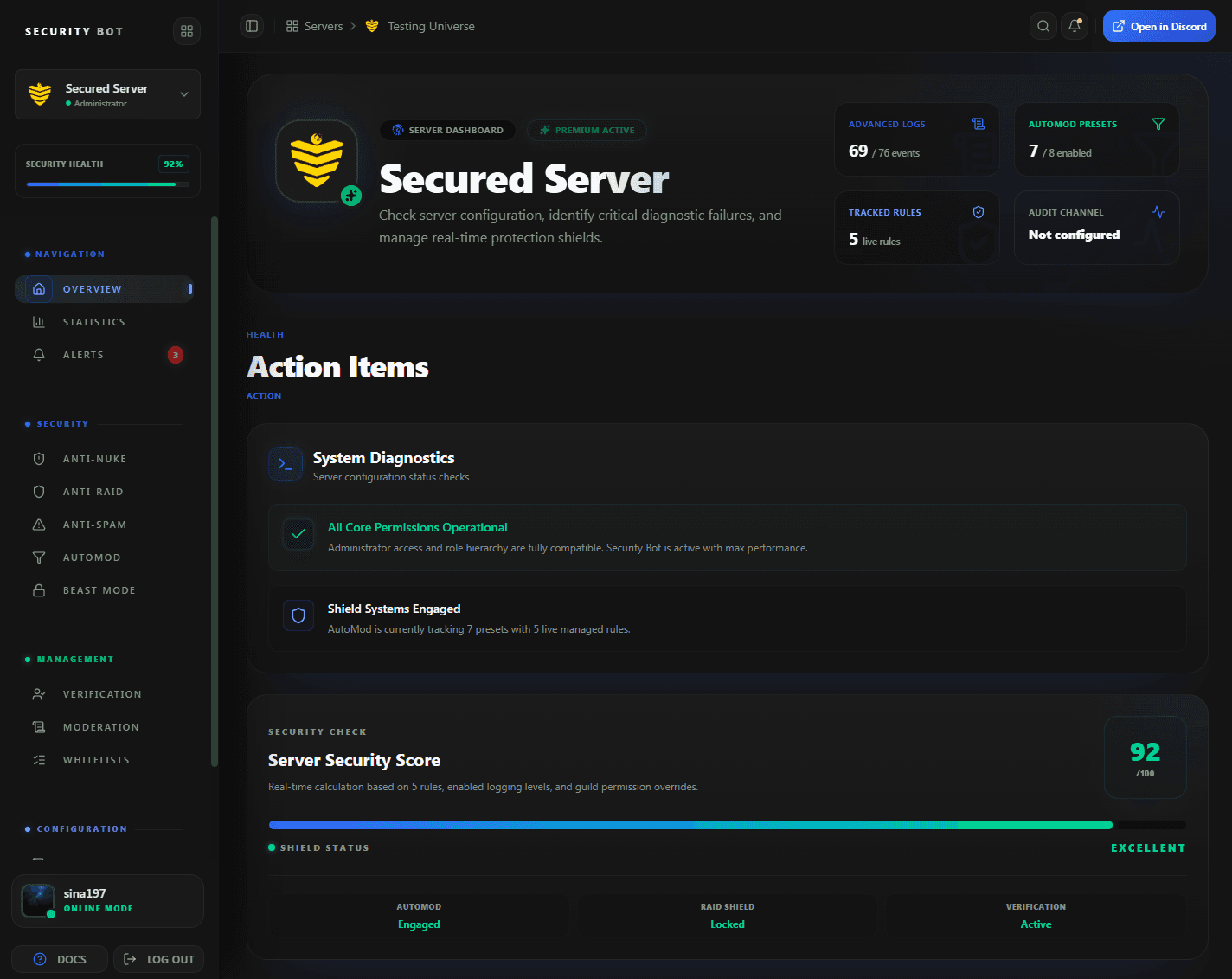
The dashboard overview. Link filters are configured on the AutoMod page, and the invite link filter on the Anti-Nuke page.
Guides
Anti Link guides
Step-by-step articles that go deeper on discord anti link bot setups and problems.
Questions
Discord Anti Link Bot FAQ
Common questions about Discord Anti Link Bot use cases, coverage, and setup.
Does Security Bot block all links?
Only the ones you choose: Discord invites, domains on the threat feed, your own watchlist, or adult sites. Other links stay allowed unless you add a rule for them.
Is the invite link blocker free?
Yes. The invite link filter is one of the free anti-nuke detection rules. Turn it on with /enable or on the Anti-Nuke page. Threat Link Guard, Mature Link Guard, and Domain Watchlist are part of Premium.
Can I allow invites in one channel?
Yes. Whitelist that channel in the Channels: Invite-Link category and the filter ignores it. Everywhere else, the filter also deletes invites to your own server.
What happens to a member who posts a scam link?
With Threat Link Guard, the bot deletes the message and runs the action you set: timeout, kick, ban, or none. The match is written to the AutoMod log channel.
Where does the scam domain list come from?
From a threat-intelligence feed that Security Bot syncs every hour, plus domains you add yourself. The dashboard shows how many domains and indicators are loaded.
Can I block all links for new members only?
Yes, on Premium. Enable Block Custom Words with the regex https?:// and exempt your verified or regular member roles. A plain http keyword does not match https:// links.
Is the invite link filter logged?
No. It deletes the message and nothing else: no log entry and no punishment. Use a Discord AutoMod rule or the Security Bot presets if you need a record.
Related
Explore more Security Bot features
Ready to protect your Discord server with Security Bot?
Add Security Bot to your server to get started with Discord Anti Link Bot. Anti-raid, anti-spam, and the other Premium modules run on a separate bot; the Premium page explains how to add it.