
Nuke Protection
Discord Anti Nuke Bot That Limits Destructive Actions
Security Bot is a Discord anti nuke bot that watches bans, kicks, channel and role changes, bot adds, prunes, and dangerous permission edits. When an account hits a limit, it is kicked, banned, or stripped of its roles. The server owner gets a DM.
- Per-user limits on bans, kicks, and creating or deleting channels and roles, plus @everyone mention spam on Premium.
- Instant triggers for bot adds, prunes, and giving or editing roles with dangerous permissions, plus webhook creation on Premium.
- Choose kick, ban, or clear roles per trigger. Punishments go to the security log, and the owner gets a DM.
Discord Anti Nuke Bot
Security Bot for Discord servers
- Free triggers
- 10 punishable actions
- Premium triggers
- 10 more on Premium
- Counter window
- Resets every 10 minutes
Last reviewed 2026-10-12
Anti Nuke coverage
Discord Anti Nuke Bot features
Limit-based triggers
Each user gets a maximum count for bans, kicks, channel and role creates and deletes, and (on Premium) @everyone mention spam. Counters reset every 10 minutes. Mention spam counts only @everyone and @here pings. Administrators are exempt from it.
Instant triggers
Some actions are punished the first time: adding a bot, pruning members, giving a member a role with dangerous permissions, or editing a role that has them. On Premium, creating a webhook is instant too.
Premium protection for identity
On Premium, defacing the server is covered too: vanity URL changes, server rename and icon change, channel and role renames, emoji rename and delete, and invite deletion. They punish whoever made the change but do not undo it.
What a Discord nuke looks like
A nuke is a fast, scripted attack from an account that already has permissions: a phished admin, a bot that was granted Administrator, or a moderator who turned.
A script can delete channels and roles, ban as many members as it reaches, and post spam through webhooks, all within minutes.
Discord's audit log tells you who did it afterwards. Required 2FA for moderators and the confirmation prompt on bulk bans add friction. But nothing in Discord caps how many destructive actions one account can take.
An anti nuke bot has to watch the actions as they happen, count them per user, and act when the count gets too high.
How Security Bot anti nuke works
Every monitored action is linked to the user who did it, using Discord's audit log. Limit-based triggers count actions per user. When a user reaches the limit for that action, the punishment for that trigger fires. The counters are cleared every 10 minutes on a fixed schedule.
Instant triggers fire on the first occurrence. If a member is given a role with dangerous permissions, Security Bot takes the role back off. If a role that has them is edited, Security Bot strips those permissions. When a bot is added, Security Bot also kicks the new bot.
Dangerous means Administrator, Kick, Ban, or Manage Channels, Roles, Server, Webhooks, Messages, Threads, or Nicknames.
On Premium, the webhook trigger deletes webhooks made in the last few minutes by a member who is not exempt. Existing webhooks are left alone.
A new server starts with seven triggers on: ban, kick, channel create and delete, role create and delete, and bot add. Premium also starts with Anti Mention Spam on, with a limit of 8. Prune, Admin Role Assign, Role Permission Change, the invite link filter, and the other Premium triggers start off.
You choose the punishment per trigger: kick, ban, or clear roles. The default is kick, except prune, which defaults to ban. Clear roles is a good choice for staff accounts. It removes the ability to continue without banning a real team member.
Each counted action appears in the security log as a User Warning, with the number of actions left. Each punishment appears as User Punished, and the server owner receives a DM.
Users are exempt if they are the server owner, hold a role above Security Bot's role, or are whitelisted for that action or for all actions. Keep the bot's role near the top. Whitelist your admin team by role rather than by user.
Security Bot needs the Administrator permission. Without it, anti nuke ignores events and dashboard changes cannot be saved.
Anti nuke and Security Bot's moderation commands
While Anti Ban and Anti Kick are on, the /ban, /softban, and /kick commands (and /banid on Premium) are capped at those limits per moderator, per 10 minutes.
When a moderator reaches the cap, further commands are refused until the counter resets. So a compromised moderator account cannot mass-ban through the bot.
The server owner and Administrators ranked above Security Bot are not capped. Whitelist entries do not raise the cap, so raise the limit instead.
Combine anti nuke with Beast Mode for attacks spread across several accounts or paced to stay under each per-user limit. Beast Mode adds up points for dangerous actions across the whole server. Once it activates, it punishes any of those actions immediately.
After a nuke: recovery
Even with limits, a few channels or roles can be lost before the punishment lands. On Premium, turn Recovery on in advance. It backs up the server on a schedule and saves each role, channel, category, and emoji the moment it is deleted.
With Restore automatically after anti-nuke on, what the punished user deleted in the last 30 minutes is put back as soon as anti-nuke punishes them. Otherwise, you restore from Recently deleted or a backup after checking a preview.
Anything deleted before Recovery was turned on cannot be restored.
Recommended limits by server size
The defaults are 5 bans, 5 kicks, 3 channel deletes, 3 role deletes, and 8 channel or role creates per user.
Under 1,000 members, consider lowering the ban and kick limits to 2 and using clear roles as the punishment. A small staff team rarely needs more than two bans in ten minutes. Clear roles is reversible if a moderator triggers it during cleanup.
Between 1,000 and 20,000 members, set the ban and kick limits to 3 and keep clear roles. Set the channel delete limit to 2, so a script loses its permissions on the second delete.
Above 20,000 members, keep the ban limit at 3 but change the punishment on channel delete and role delete to ban. At that size, a single role deletion strips access for thousands of people. The account doing it should be gone, not just stripped.
In every size band, whitelist your admin role per action for the work it really does in bulk, never for all actions.
A worked example: a phished admin at 3 a.m.
An admin clicks a fake Nitro link, and a nuke script starts running on their account. Its first move is to add its own bot.
Bot add is an instant trigger. Security Bot applies the punishment you chose, clear roles, on that first action and kicks the new bot. The account loses its admin role, so the script's later calls fail for lack of permissions.
If the script starts with channel deletes instead, and your channel delete limit is 2, the second delete reaches the limit. The same punishment fires, and two channels are lost. The security log shows a User Warning after the first delete and User Punished after the second. The owner gets a DM.
If Recovery was on (Premium) with Restore automatically after anti-nuke, the two channels come back with their permission overrides once the punishment fires. Without that option, restore them from Recently deleted on the Recovery page.
The admin resets their password, which logs out every device, and you give the role back.
Common anti nuke mistakes and how to fix them
The mistake that defeats everything is role order. A staff role above Security Bot's role is exempt from every trigger, so a compromised account there is untouchable. Keep the bot's role at the top.
The second is whitelisting for all actions. A Roles: All or Users: All entry bypasses every anti nuke check, but the admin team usually only needs channel and role actions. Whitelist per action instead.
Turning off a trigger after a false positive leaves a hole. Instead, add a whitelist entry for the role that needs the action and keep the trigger on.
Skipping the security log channel means the owner's DM is the only record of a punishment, and nobody else reviews them.
On the Discord side, turn on the 2FA requirement for moderation. Keep Manage Server to the owner and one admin, since that permission is what adds bots.
Setup
How to set up Discord Anti Nuke Bot
Steps that list a command can also be done in Discord. On Premium, settings commands such as /setlimit and /whitelist reply with a dashboard link instead.
Step 1: Move Security Bot's role to the top
Anti nuke can only act on users ranked below the bot, and it needs the Administrator permission. In Server Settings, Roles, drag the bot's role above every staff role.
Step 2: Review the default limits
Open Anti-Nuke in the dashboard to see which triggers are on and their limits. On the free tier, the settings command shows the same in Discord. On Premium, settings are managed in the dashboard.
Command:
/settings category:Anti NukeStep 3: Set limits that match your team
Lower a limit if your staff rarely do that action. Raise it for large servers with active mod teams. The ban and kick limits also cap bot moderation commands.
Command:
/setlimit action:Banning Members limit:3Step 4: Choose punishments
Pick kick, ban, or clear roles per trigger. Clear roles is a reversible choice for accidental staff triggers.
Command:
/setpunishment action:Banning Members punishment_type:Clear RolesStep 5: Whitelist your admin role
Exempt a trusted role from specific actions instead of whitelisting individual users or all actions.
Command:
/whitelist add_role role:@Admin category:Roles: Channel-DeleteStep 6: Set a security log channel
On the Logging page, or with /logs security on the free tier, pick the channel for anti nuke warnings and punishments so the team can see them.
Command reference
Discord Anti Nuke Bot commands
Slash commands you can run in Discord. Moderation commands work on every plan; on Premium, settings commands reply with a dashboard link instead.
| Command | What it does |
|---|---|
/settings category | Show the current Anti Nuke, Verification, or Beast Mode settings. |
/setlimit action limit | Change how many times an action, such as Banning Members, is allowed per user before the counters reset every 10 minutes. |
/setpunishment action punishment_type | Set Kick, Ban, or Clear Roles for a trigger. |
/enable action | Turn a trigger on, for example Sending invite links. |
/disable action | Turn a trigger off. |
/whitelist add_role role category | Exempt a role from one action, such as Roles: Channel-Delete, or from all actions with Roles: All. |
/whitelist view_roles category | List the roles whitelisted in a category. |
Dashboard
The Security Bot dashboard
The server overview in the web dashboard, where Discord Anti Nuke Bot and every other module is configured.
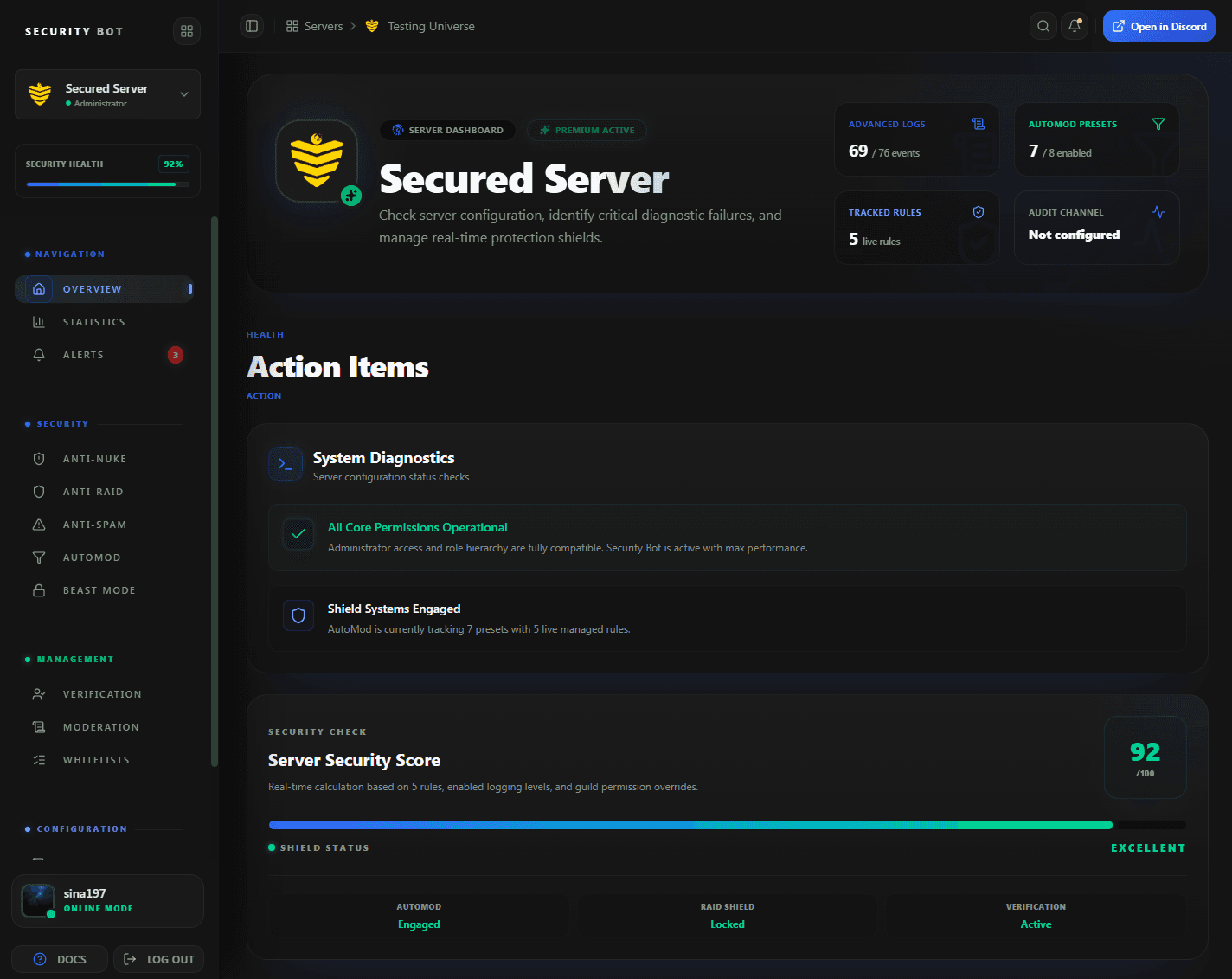
The dashboard overview. Anti nuke limits and punishments are set on the Anti-Nuke page, opened from the sidebar.
Guides
Anti Nuke guides
Step-by-step articles that go deeper on discord anti nuke bot setups and problems.
Questions
Discord Anti Nuke Bot FAQ
Common questions about Discord Anti Nuke Bot use cases, coverage, and setup.
What does the Discord anti nuke bot watch?
On the free tier: bans, kicks, channel create and delete, role create and delete, bot adds, prunes, giving a role with dangerous permissions to a member, and editing a role that has them, plus an invite link filter. Premium adds webhook creation, @everyone mention spam, vanity URL changes, server name and icon changes, channel and role renames, emoji rename and delete, and invite deletion.
Can I choose the punishment for each trigger?
Yes. Every punishable trigger can kick, ban, or clear roles independently. The default is kick, except prune, which defaults to ban.
Will my admins get punished for normal work?
Counters reset every 10 minutes and limits are per action, so normal moderation usually stays under them. Whitelist your admin role for the actions it performs in bulk, or raise the limit.
Does anti nuke stop a compromised bot?
Adding a bot is an instant trigger: the person who added it is punished and the new bot is kicked. Any bot ranked below Security Bot is subject to the same limits as a user.
Is anti nuke free?
Ten punishable triggers and the invite link filter are free. Premium adds ten more triggers, including webhook creation and vanity URL protection.
Can anti nuke restore deleted channels?
Anti nuke stops the attacker. To restore what was deleted, turn on Recovery on Premium in advance. It keeps scheduled backups and saves deleted roles, channels, categories, and emojis. With Restore automatically after anti-nuke on, it puts back what the punished user deleted in the last 30 minutes.
Does anti nuke need a moderator online?
No. Limits and instant triggers are enforced automatically when they are reached, and the server owner gets a DM for every punishment. The security log shows what happened when the team is back.
Can I configure anti nuke with slash commands?
On the free tier, yes: /settings, /setlimit, /setpunishment, /enable, /disable, and /whitelist work in Discord, and the dashboard works too. On Premium, settings are managed in the dashboard and those commands reply with a dashboard link.
Related
Explore more Security Bot features
Ready to protect your Discord server with Security Bot?
Add Security Bot to your server to get started with Discord Anti Nuke Bot. Anti-raid, anti-spam, and the other Premium modules run on a separate bot; the Premium page explains how to add it.