
User Verification
Discord Verification Bot with Adaptive Captcha and Web Checks
Security Bot is a Discord verification bot that keeps new members behind an Unverified role until they pass. Adaptive Verification picks the check per member: low-risk accounts get straight in, others get an image captcha or a 5-second web check. When joins spike, it raises the bar on its own. Passing removes the role and can add your Verified role.
- Pick Adaptive, web check, image captcha, one-click, a server passcode, or an allowlist, and switch at any time.
- Security Bot creates the Unverified role and verification channel, and sets the permissions that hide the rest of the server.
- Combine verification with anti-raid on Premium so join waves are scored and punished as well as gated.
Discord Verification Bot
Security Bot for Discord servers
- Verification types
- Adaptive, web check, captcha, one-click, passcode, allowlist
- Gate
- Unverified role + verification channel
- Price
- Free, customization on Premium
Last reviewed 2026-10-17
Verification coverage
Discord Verification Bot features
Adaptive Verification
The bot scores each new member on account age, avatar, past attempts, and your server's join rate. Low-risk members get in at once. The rest get an image captcha or the web check. Pick Relaxed, Balanced, or Strict.
Web check
Members open a personal link, wait about 5 seconds, and are verified. Nothing to solve. Automated browsers are denied, and you can block VPNs, proxies, and alt accounts. Security Bot stores only keyed hashes, never the IP itself.
Image captcha in Discord
Members press Verify in the verification channel, get a captcha image only they can see, and answer with /verify. You set code length (4 to 8 characters), timeout (30 seconds to 5 minutes), noise lines, colors, numbers, and case sensitivity.
One-click button verification
The lowest-friction option: members press a button to verify. Good for communities that mainly want to stop drive-by spam and keep a clean onboarding step.
Server passcode
Members press Verify and type a code you share, never their Discord password. Each code can give a role, expire, or stop after a set number of uses. Security Bot stores only a hash.
Allowlist
Only user IDs on your list can stay. Anyone else gets a DM with their user ID, so they can ask you, and is removed. An empty list holds members instead.
Why a Discord verification bot matters
An open invite link brings real members and also bot accounts, throwaway alts, and raiders who join in waves. A verification bot puts a gate between joining and posting. New members get an Unverified role that can see only the verification channel. They get access to the rest of the server after they pass.
That gate raises the cost of automated join spam. Each account has to pass a check before it can post. Accounts that fail or ignore verification never reach your general channels, so moderators spend time on real people instead of cleanup. Captcha-solving services exist, so treat verification as one layer, not a wall.
Security Bot gives you six verification types. Adaptive suits most servers: established accounts get straight in, while new accounts and raid waves get a check. Pick one-click for the least friction, or the web check to send every join through a browser check. A passcode or an allowlist lets in only the people you choose.
How Security Bot verification works
When verification is enabled, new members get the Unverified role automatically. In Adaptive mode, members the bot lets in at once skip it and get your Verified role instead. Allowlist mode does the same for listed members.
When Security Bot creates the role, it adds a permission overwrite on every channel that denies the Unverified role View Channel. That covers text, voice, announcement, forum, stage, and media channels. The verification channel is the one place the role can see.
Each path can only be passed its own way. A captcha member types the code with /verify before it expires. /verify accepts only a code the bot issued to that member, so it cannot skip the web check or the button.
After a successful check, Security Bot removes the Unverified role and, if you configured one, adds the Verified role. The server owner, or an Administrator ranked above Security Bot, can verify someone by hand with /verification verify when a member cannot complete the check.
How Adaptive Verification and the web check work
Adaptive Verification adds up risk for each join. A new account, a default avatar, recent wrong codes, or a denied web check add points. An earlier pass in this or another server takes points away. The score decides: straight in, an image captcha, or the web check. Three wrong codes in a day move a member to the web check.
It also compares your join rate with the server's normal pace. When joins spike or young accounts arrive in a burst, every score rises until the wave passes, and the security log gets a raid alert. Relaxed checks only the riskiest joins. Strict checks every account under 90 days old or with a default avatar.
The web check needs no clicks. The member presses Verify, or opens the link the bot sends by DM, and the page finishes in about 5 seconds. Each link is personal, lasts 30 minutes, and works without signing in to securitybot.gg.
The page denies automated browsers. You can also block VPNs, proxies, Tor, and hosting IPs. Alt accounts that share a browser or device with a verified member can be logged, held for an admin, or blocked. Denials and alt matches go to your security log. Security Bot stores only keyed hashes of the IP, device, browser, and hardware.
Server passcode and allowlist for private servers
A server passcode suits invite-only groups, classes, and events that share a code somewhere else. Members press Verify in the verification channel and type the code in a form. Codes are not case sensitive. A server can have up to 10, each with its own name, role, expiry, and use limit.
Security Bot stores only a salted hash of each code, so it can't show a code again. After five wrong tries in 10 minutes, a member has to wait, and the security log notes it. The form never asks for a Discord password, so never reuse one as a code.
The allowlist suits staff servers and groups with a known member list. Add up to 5,000 user IDs in the dashboard or with /verification allowlist add. Listed members get straight in. Anyone else gets a DM with their user ID and is removed.
No bot can stop someone from joining, so the allowlist acts right after the join. If the list is empty or can't be read, members wait in the Unverified role instead of being removed. So do members the bot isn't allowed to remove.
Verification plus anti-raid and AutoMod
Verification is strongest as part of a stack. On Premium, anti-raid scores each join by account age, join speed, and missing avatar, and can punish the wave and lock the channels you choose. AutoMod filters links and mention spam from the members who do get through.
Because these run in one bot, the rules do not fight each other. A member who passes verification is still subject to anti-spam and anti-nuke limits. Passes are not logged. Web check denials, alt matches, raids that Adaptive detects, allowlist removals, and passcode lockouts go to the security log.
Premium verification options
The core verification system is free for every server. Premium adds a custom verification message, color, and banner image, so the gate matches your server's identity.
Premium+ goes further with a custom bot name, avatar, and status, so the verification prompt members see comes from your own bot identity instead of Security Bot.
Recommended verification settings by server type
Most servers should start with Adaptive Verification on Balanced. Established members get straight in, new accounts solve an image captcha, and the riskiest joins get the web check. A small private server can use one-click instead. It stops drive-by spam for a single button press. Invite-only servers can use a passcode or an allowlist.
For the captcha step, use 5 or 6 characters, a 2-minute timeout, one noise line, and case sensitivity off for the first week. Those values add friction for scripted joins without stranding people on phones. On Premium, turn anti-raid on beside it.
Crypto, NFT, marketplace, and other scam-raid targets should use Adaptive on Strict or the web check, with VPN and alt blocking on. Both raise the cost of each fake account. Neither stops a determined attacker outright.
Set Discord's verification level to High as well, so every member must also have been in the server for ten minutes before posting. Members with a verified phone number skip the level's requirements, so High alone does not stop phone-verified accounts.
Turn on the link filters so a verified scammer cannot easily post a wallet drainer. If you run several servers, Premium comes in 1, 3, and 7 server bundles, and each server picks its own type.
Common verification mistakes and how to fix them
A frequent failure is a channel that unverified members can still see. Role order does not decide channel access. If any of a member's roles has an allow overwrite for View Channel on a channel, that allow beats the Unverified role's deny.
So do not hand out auto-roles or reaction roles that have channel allows before members verify. Security Bot's own role must sit above Unverified so it can remove the role after a member passes.
Channels added after setup do not have the Unverified overwrite. Run update_role after every new channel. It adds the missing overwrite to channels of any type. A channel only copies its category's permissions while it is synced, so do not rely on a category setting alone.
Plan a manual fallback. Some real members cannot solve a captcha on a bad connection, and /verification verify approves them without changing any settings. It needs the server owner or an Administrator ranked above Security Bot, so tell members whom to ask.
If you block VPNs in the web check, some real members will be denied. iCloud Private Relay and some work networks count as proxies. The page tells them to turn it off and reload, so mention this in your verification message.
Finally, do not run verification alone on a public server. A raid of 200 accounts still fills the verification channel and your join log. Pair it with anti-raid so the wave is scored and channels can lock.
What Discord provides natively and what the bot adds
Discord ships several verification layers of its own. The verification level requires a verified email, a five-minute-old account, ten minutes in the server, or a verified phone number before a member can post. A verified phone skips the other requirements.
Rules Screening on Community servers makes new members accept your rules before they can talk. Raid Protection, under Safety Setup, can require a CAPTCHA from new joiners for an hour after Discord detects a raid.
All are worth turning on. But none of them asks every new member for a check of your choice, and a script can accept rules as easily as a person.
A verification bot adds a check on every join. Security Bot builds the Unverified role and channel, assigns the role on every join, runs the check, and removes the role on success.
Use the native level as the floor: Medium for most public servers, High if you get raided. Let the bot handle the human check on top.
Setup
How to set up Discord Verification Bot
Steps that list a command can also be done in Discord. On Premium, settings commands such as /setlimit and /whitelist reply with a dashboard link instead.
Step 1: Add Security Bot and open the dashboard
Invite the bot, then use the Verification page in the dashboard. On the free tier you can also use the slash commands below. On Premium, verification settings are managed in the dashboard.
Step 2: Enable verification
Turn the module on. Nothing changes for existing members until the role and channel exist.
Command:
/verification enableStep 3: Create the Unverified role
Security Bot creates the role and adds an overwrite on every channel that hides it from unverified members. Keep Security Bot's role above Unverified so it can remove the role.
Command:
/verification setup_roleStep 4: Create the verification channel
Creates a channel that only unverified members can see. This is where the captcha or button appears.
Command:
/verification setup_channelStep 5: Choose the verification type
Pick Adaptive, web check, image captcha, one-click, a passcode, or an allowlist. Then set the options for that type, such as Adaptive's strictness, your passcodes, or the allowed user IDs.
Command:
/verification typeStep 6: Optional: set a Verified role
Give members a role after they pass so you can gate channels on it. Running the command without a role resets it.
Command:
/verification set_verified role:@Verified
Command reference
Discord Verification Bot commands
Slash commands you can run in Discord. Moderation commands work on every plan; on Premium, settings commands reply with a dashboard link instead.
| Command | What it does | Who can run it |
|---|---|---|
/verification enable | Turn verification on for the server. | Administrator |
/verification disable | Pause verification without deleting the role or channel. | Administrator |
/verification setup_role | Create the Unverified role and hide your channels from it. | Administrator |
/verification setup_channel | Create the verification channel visible only to unverified members. | Administrator |
/verification type type | Switch between Adaptive Verification, Web Check, Captcha Code, One-Click Verification, Server Passcode, and Allowlist. | Administrator |
/verification adaptive strictness level | Set Adaptive Verification to Relaxed, Balanced, or Strict. | Administrator |
/verification webcheck vpn block | Block or allow VPNs, proxies, Tor, and hosting IPs in the web check. | Administrator |
/verification webcheck alts action | Log, hold for review, or block accounts whose browser or device already verified another member. | Administrator |
/verification passcode add code [name] [role] [expires_in_days] [max_uses] | Add a server passcode. It can give a role, expire after 1 to 365 days, or stop after a set number of uses. | Administrator |
/verification passcode list | List the server's passcodes with their numbers, uses, and expiry. Codes themselves are never shown. | Administrator |
/verification passcode remove id | Remove a passcode by its number from the list. | Administrator |
/verification allowlist add user | Let a user in on Allowlist verification. Accepts a mention or a user ID. | Administrator |
/verification allowlist remove user | Take a user off the allowlist. It doesn't remove them from the server. | Administrator |
/verification allowlist list | Show who is on the allowlist. The dashboard shows the full list. | Administrator |
/verification set_verified [role] | Choose the role members receive after verifying; leave it empty to reset. | Administrator |
/verification update_role | Add the missing Unverified overwrite to channels of any type you added after setup. | Administrator |
/verification verify user | Manually verify a member who cannot complete the check. | Server owner, or Administrator above bot |
/verification reset | Delete the Unverified role and the verification channel and turn verification off. | Administrator |
/verify captcha | Used by new members to answer the image captcha. It accepts only a code the bot issued to that member and does not work for the other paths. | Any member |
Dashboard
The Security Bot dashboard
The server overview in the web dashboard, where Discord Verification Bot and every other module is configured.
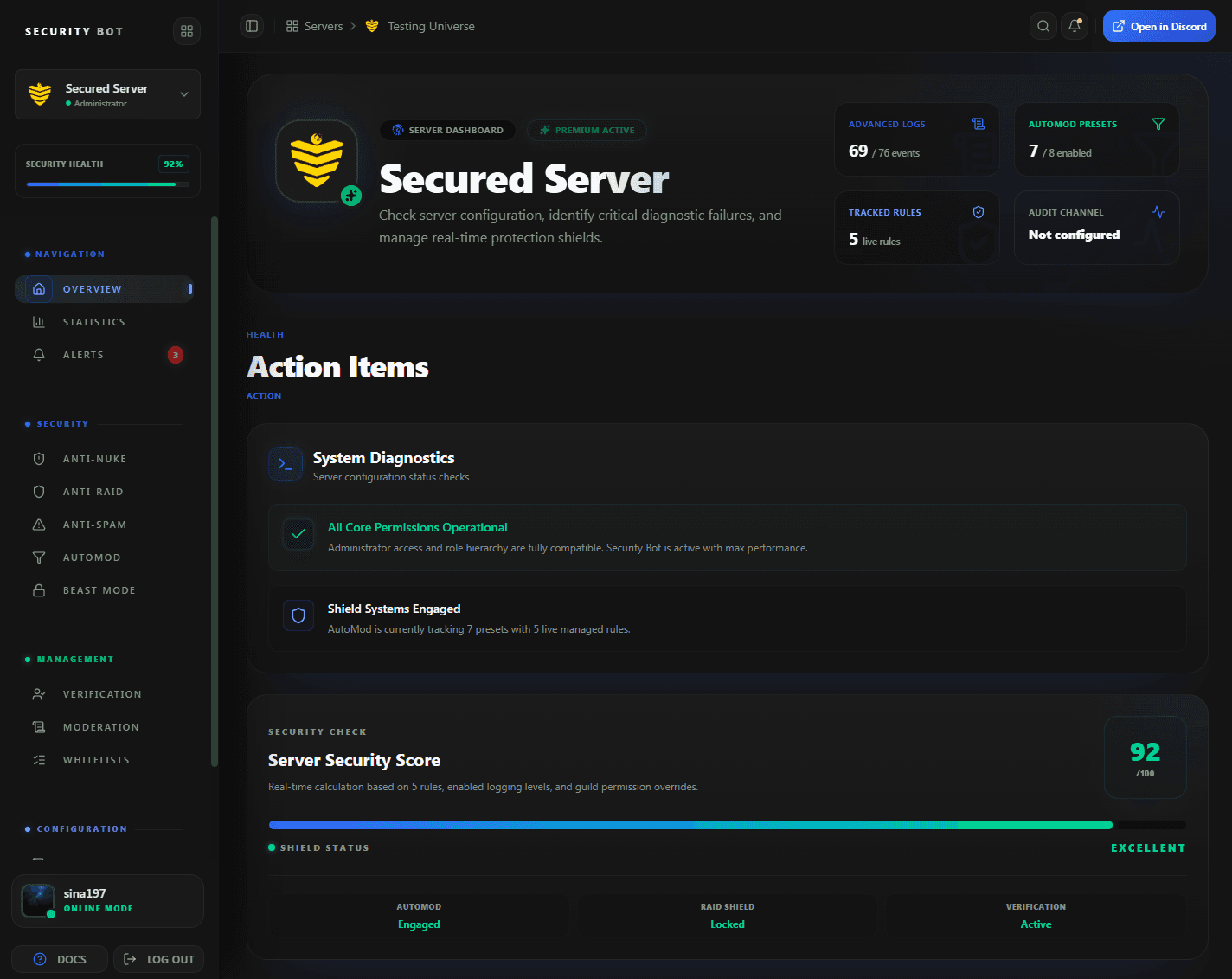
The dashboard overview. Verification settings are on the Verification page, opened from the sidebar.
Guides
Verification guides
Step-by-step articles that go deeper on discord verification bot setups and problems.
Questions
Discord Verification Bot FAQ
Common questions about Discord Verification Bot use cases, coverage, and setup.
Is the Security Bot verification bot free?
Yes. All six types are free, including the web check with VPN and alt blocking, server passcodes, and the allowlist. Premium adds a custom verification message, color, and banner.
Which verification type should I use?
Use Adaptive for most servers. Use the web check for a browser check on every join, image captcha to keep the check inside Discord, and one-click for the least friction. Use a passcode or an allowlist when only invited people should get in.
Do members need to give the bot access to their account?
No. The web check link is personal, so members don't sign in. Members who do sign in at securitybot.gg grant only the identify and guilds scopes, which cannot read messages or act as them.
What happens if a real member fails the captcha?
They can try again. In Adaptive mode, three wrong codes in a day move them to the web check. The server owner or an Administrator ranked above Security Bot can also approve them with /verification verify.
Can verification stop a raid on its own?
Adaptive Verification checks more members while joins spike, which slows a raid down. Pair it with anti-raid on Premium so join waves are scored and punished and channels can lock.
How do I make the verification channel disappear after verifying?
The verification channel is hidden from @everyone and visible only to the Unverified role, so once the role is removed the member no longer sees it. Run update_role after adding channels so they stay hidden from unverified members.
Can I switch verification types later?
Yes. All six types share the same Unverified role and verification channel, so you can change the type at any time without rebuilding anything.
Is verification logged?
Partly. Web check denials, possible alt accounts, raids that Adaptive detects, allowlist removals, and passcode lockouts go to the security log. Passes are not logged.
Does a server passcode ask for a member's Discord password?
No. A server passcode is a code you make up and share. Security Bot never asks for a Discord password, and you shouldn't reuse one as a code.
Can the allowlist stop people from joining?
No bot can block a join. Security Bot removes members who aren't listed right after they join and DMs them their user ID. Listed members get in at once.
Related
Explore more Security Bot features
Ready to protect your Discord server with Security Bot?
Add Security Bot to your server to get started with Discord Verification Bot. Anti-raid, anti-spam, and the other Premium modules run on a separate bot; the Premium page explains how to add it.