
Staff Moderation
Discord Moderation Bot Without Dangerous Permissions
Security Bot gives moderators ban, kick, softban, mute, lock, and clear commands. You get per-user access, a cap on bot bans and kicks, and a moderation log. Staff can moderate through the bot without Ban Members, Manage Channels, or Administrator on their role.
- Eleven commands: ban, unban, softban, kick, mute, unmute, clear, lock, unlock, lockall, unlockall. Premium adds /banid and /raid ban.
- Grant command access per user from the dashboard instead of granting native Discord permissions.
- While Anti Ban and Anti Kick are on, their limits cap bot bans, softbans, and kicks per moderator.
Discord Moderation Bot
Security Bot for Discord servers
- Commands
- 11 free, 13 on Premium
- Access model
- Per-user permissions
- Safety net
- Capped bans and kicks + mod log
Last reviewed 2026-10-12
Moderation coverage
Discord Moderation Bot features
Zero-permission moderation
Moderators run /ban or /kick through Security Bot with a custom permission, so their own role never needs Ban Members or Kick Members. If their account is compromised, the attacker gets the bot's capped commands, not raw Discord permissions.
Caps on bans and kicks
The ban, softban, and kick commands (and /banid on Premium) are capped per moderator, per 10 minutes. The caps are your Anti Ban and Anti Kick limits, while those are on. Further commands are refused until the counter resets.
Audit trail in your mod log
Every ban, unban, softban, kick, mute, unmute, lock, and unlock is written to your moderation log channel with who did it and why. You can review staff actions without digging through the Discord audit log.
Why secure moderation beats raw Discord permissions
Many server nukes come from inside: a staff account that was phished, a moderator who left angry, or a bot with more permissions than it needed.
The native Discord permission model makes this worse. To let someone ban spammers, you have to give them Ban Members across the server, with no cap on how many they can ban.
Security Bot moves those actions behind the bot. Staff keep a normal member role and get command access from the Moderation page in the dashboard or the /permission command. The bot performs the ban with its own permission, checks the cap first, and logs the result.
The practical effect is that adding a new moderator no longer adds an uncapped way to empty the server. Their ban and kick power is the bot's, and it is capped per 10 minutes.
Who can run a moderation command
A command runs if the user is the server owner or has the Security Bot custom permission for that command. It also runs if the user has the matching Discord permission and a role above Security Bot's role, for example Ban Members, or Timeout Members for /mute.
Custom permissions are set per user on the Moderation page or with /permission add.
Role hierarchy still applies to the target. Nobody can moderate a member whose highest role is at or above their own. Security Bot's role must sit above the roles it acts on.
Softban, lock, and lockall explained
Softban bans a member and immediately unbans them. It deletes their recent messages (one day by default, up to seven with delete_days) without keeping them out. That makes it the right tool for spam accounts and for members who need a reset rather than a permanent ban.
Lock stops new messages in one channel. Lockall does it for every regular text channel the bot can manage. Lock and lockall take an optional time, and the channels reopen on their own when it runs out, even if the bot restarts in between.
Unlockall reopens only the channels Security Bot locked, with lock, lockall, anti-raid, or anti-spam. It puts each one's @everyone Send Messages setting back as it was, so channels that were already read-only stay read-only.
During a raid, lockall buys your team time while anti-raid and anti-spam clean up.
Moderation and the rest of the protection stack
Moderation commands go to the moderation log, AutoMod hits to the AutoMod log, and anti-nuke warnings and punishments to the security log. Staff can see what the bot did automatically and what staff did by hand. Timeouts, kicks, and bans that Security Bot applies after an AutoMod hit also appear in the moderation log.
/mute applies a Discord timeout of up to 28 days. Timed bans and locks are lifted on their own, and /unban cancels a timed ban early.
The cap on bot bans and kicks uses your anti-nuke ban and kick limits while those triggers are on. The whitelist does not raise it. If a lead moderator regularly needs more bans in 10 minutes, raise the ban limit a little, which also applies to native bans. /mute, /clear, and the lock commands are not capped.
A worked example: onboarding a new moderator
A new moderator joins the team. Instead of adding Ban Members or Manage Channels to their role, open the Moderation page in the dashboard. Pick their account and tick ban, softban, kick, mute, clear, and lock. Their Discord role stays a plain member role.
When they run /mute with a time on a spammer, the bot applies a Discord timeout for that long. It writes the moderator, target, reason, and duration to the moderation log.
A month later their account is phished. The attacker opens Discord and starts running /ban on members one after another. With a ban limit of 3, the attacker gets three bans. The fourth /ban is refused with "You have reached the ban limit, try again later." until the 10-minute counter resets.
The cap slows the attacker down but does not remove them, so act on the moderation log. Three members need an unban. Remove the account's command access on the Moderation page or with /permission reset. With native Ban Members on that role, there would have been no cap at all.
Ban, kick, softban, timeout, and lock: which to use
Use /mute, a Discord timeout, when someone needs to cool off but stay in the server. On Premium, AutoMod presets can apply a bot timeout automatically for 1 minute to 1 week.
Use kick as a strong warning: the member is removed and can rejoin immediately. Use softban when a real member's account was compromised or they pasted a scam link everywhere. It deletes their recent messages and lets them rejoin. Use ban only when you want them gone, optionally with a time so the ban lifts on its own.
Use clear after a spam run. It checks up to 100 recent messages in the current channel and deletes them. Optionally, it deletes only those from one user, from bots, or with links, embeds, or images. Discord only allows bulk deletion of messages under two weeks old.
Use lock with a time to pause a heated channel and let it reopen on its own. Use lockall when a raid is arriving and you need every regular text channel frozen at once.
/unban takes a username or user ID, so keep the ID from the moderation log entry if you expect to lift a ban later.
Common moderation setup mistakes
Leaving Ban Members and Manage Channels on staff roles after moving them to the bot defeats the point. The native permission is still there for an attacker, and native bans are only stopped when anti-nuke punishes the account at the limit. Remove it.
Putting the bot's role below staff roles means the bot cannot act on them. Commands fail against senior staff, and anti-nuke ignores them. Drag the bot's role to the top.
Skipping the moderation log channel hides staff actions from review. Set it on the Logging page before granting any commands.
Setup
How to set up Discord Moderation Bot
Steps that list a command can also be done in Discord. On Premium, settings commands such as /setlimit and /whitelist reply with a dashboard link instead.
Step 1: Invite Security Bot with the default permissions
Security Bot needs Administrator and must sit above the roles it moderates. Drag its role near the top of Server Settings, Roles.
Step 2: Open the Moderation page in the dashboard
Choose a moderator and tick the commands they may use: ban, kick, softban, mute, clear, lock, and the rest. Save.
Command:
/permission addStep 3: Set a moderation log channel
On the Logging page, pick the channel where moderation actions are logged.
Step 4: Remove dangerous native permissions
Take Ban Members, Kick Members, Manage Channels, and Administrator off staff roles that no longer need them. Staff keep moderating through the bot.
Step 5: Check your anti-nuke limits
While Anti Ban and Anti Kick are on, their limits also cap /ban, /softban, /banid, and /kick per moderator. Set limits that fit how fast your team really works.
Command:
/settings category:Anti Nuke
Command reference
Discord Moderation Bot commands
Slash commands you can run in Discord. Moderation commands work on every plan; on Premium, settings commands reply with a dashboard link instead.
| Command | What it does | Who can run it |
|---|---|---|
/ban user [time] [reason] [delete_days] | Ban a member, optionally for a set time; a timed ban lifts on its own. Capped by the ban limit while Anti Ban is on. | Ban Members (above bot) or custom permission |
/banid user_id [time] [reason] [delete_days]Premium | Ban a user by ID, optionally for a set time. Capped by the ban limit while Anti Ban is on. | Ban Members (above bot) or custom permission |
/unban user [reason] | Lift a ban, including a timed one before it runs out. Takes a username or user ID. | Ban Members (above bot) or custom permission |
/softban user [reason] [delete_days] | Ban and immediately unban to delete recent messages. Capped by the ban limit while Anti Ban is on. | Ban Members (above bot) or custom permission |
/kick user [reason] | Remove a member without banning. Capped by the kick limit while Anti Kick is on. | Kick Members (above bot) or custom permission |
/mute user time [reason] | Apply a Discord timeout, up to 28 days. | Timeout Members (above bot) or custom permission |
/unmute user [reason] | Remove a member's timeout. | Timeout Members (above bot) or custom permission |
/clear amount [user] [bots] [embeds] [links] [images] | Check up to 100 recent messages in the current channel and delete them, optionally filtered. Not logged. | Manage Messages (above bot) or custom permission |
/lock [channel] [reason] [time] | Stop new messages in one channel, optionally until a set time, when it reopens on its own. | Manage Channels (above bot) or custom permission |
/unlock [channel] [reason] | Undo a Security Bot lock and put the channel back as it was; on a channel the bot did not lock, allow @everyone to send messages. | Manage Channels (above bot) or custom permission |
/lockall [reason] [time] | Lock every regular text channel the bot can manage, optionally until a set time. | Manage Channels (above bot) or custom permission |
/unlockall [reason] | Reopen only the channels Security Bot locked and put each back as it was. | Manage Channels (above bot) or custom permission |
/raid ban minimum_score join_time ban_durationPremium | Ban recent joins whose anti-raid score is above a minimum, for joins in the last 30 minutes up to a day, permanently or for a set time. Not logged. | Administrator (above bot) |
Dashboard
The Security Bot dashboard
The server overview in the web dashboard, where Discord Moderation Bot and every other module is configured.
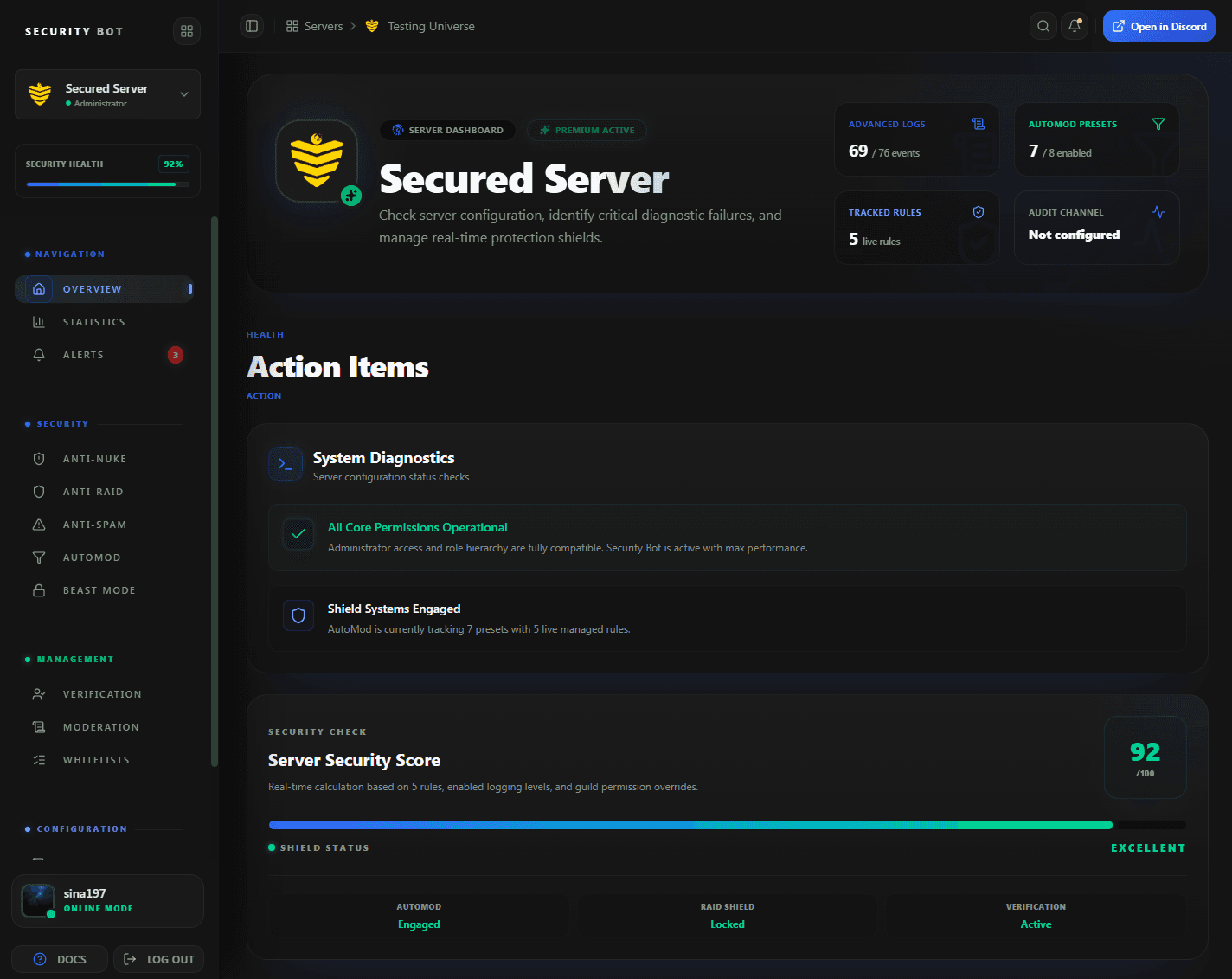
The dashboard overview. Per-user command permissions are set on the Moderation page, opened from the sidebar.
Guides
Moderation guides
Step-by-step articles that go deeper on discord moderation bot setups and problems.
Questions
Discord Moderation Bot FAQ
Common questions about Discord Moderation Bot use cases, coverage, and setup.
Do my moderators need Ban Members to use /ban?
No. Give them the custom permission for the ban command on the Moderation page and the bot performs the ban with its own permission.
What does the /softban command do?
It bans a member and immediately unbans them. That deletes their recent messages (up to seven days with delete_days) but lets them rejoin, which is useful for spam cleanup.
Does anti-nuke apply to moderation commands?
Partly. While Anti Ban and Anti Kick are on, /ban, /softban, /banid, and /kick are capped at those limits per moderator, per 10 minutes. At the cap, further commands are refused rather than punished. /mute, /clear, and the lock commands are not capped, and the owner and Administrators ranked above Security Bot are not capped either.
Can I lock the whole server during a raid?
Run /lockall to lock every regular text channel the bot can manage. Run /unlockall when the raid is over. It reopens only the channels Security Bot locked. On Premium, anti-raid can also lock the channels you choose automatically.
Are moderation actions logged?
Every command except /clear and /raid ban is written to the moderation log channel you choose, including the moderator, target, and reason.
Does Security Bot replace Discord AutoMod?
No. On Premium it manages Discord AutoMod rules from the dashboard and adds bot filters on top, alongside the moderation commands.
Can I give a moderator only some commands?
Yes. Command access is granted per user and per command on the Moderation page, so a trial moderator can have mute and clear while senior staff also get ban and lockall.
Related
Explore more Security Bot features
Ready to protect your Discord server with Security Bot?
Add Security Bot to your server to get started with Discord Moderation Bot. Anti-raid, anti-spam, and the other Premium modules run on a separate bot; the Premium page explains how to add it.