
Join Defense
Discord Anti Raid Bot for Join Scoring and Channel Lockdown
Security Bot is a Discord anti raid bot. It scores joins on account age, join speed, and missing avatar. At your score limit, it times out or bans everyone who joined in the raid window and can lock chosen channels. Part of Premium.
- Score joins on account age, join speed, and missing avatar. A join that matches none adds a small normal-join score.
- At your limit, time out or ban everyone who joined in the scoring window, except accounts the age bypass skips.
- Lock chosen channels for a set time, 20 minutes by default. They reopen on their own when it ends.
Discord Anti Raid Bot
Security Bot for Discord servers
- Detection model
- Score-based joins
- Response
- Timeout or ban + channel lock
- Availability
- Premium
Last reviewed 2026-10-17
Anti Raid coverage
Discord Anti Raid Bot features
Join scoring you can read
Every factor is a number you set. Give points for a new account (and set how new counts), for joining within seconds of the last join, and for no profile picture. A join that matches none adds the normal-join score.
Threshold, not guesswork
Join scores add up until the reset time clears them. When the total reaches your limit, Security Bot times out or bans the accounts that joined in that window. If lockdown is on, it also locks the channels you picked.
Bypass for established accounts
Accounts older than the minimum age you set skip scoring. Long-standing Discord users are not counted toward a raid or punished with it. The bypass is on by default and skips accounts older than 120 days.
How Discord raids actually work
A raid is a burst of accounts joining at the same time. They are often created in bulk shortly before, with default avatars and no history.
Once inside, they post spam, mass-mention, or send scam links. Speed is the point: by the time moderators react, the channels are already flooded.
That is why an anti raid bot acts on the join, not the first message. Security Bot checks each join as it happens. It treats a cluster of suspicious joins as one event, not dozens of separate members.
Discord has its own Raid Protection under Server Settings > Safety Setup > Raid Protection and CAPTCHA. It detects join raids with machine learning and sends Activity Alerts. It can also require a CAPTCHA from new joiners for an hour after a raid.
Discord's tool does not use your own scoring weights, punish the accounts in the wave, or lock channels. That is what anti-raid adds.
How Security Bot scores and stops a raid
Each join is scored. It gets extra points if the account is younger than your age threshold, if it joined within your join-row delay of the previous join, and if it has no avatar. A join that matches none of these adds the normal-join score. You can edit every value on the Anti-Raid page.
When the combined score reaches the score limit, Security Bot applies the punishment you picked: timeout, ban, or none. It hits every account that joined in the current scoring window, including normal-looking joins, except accounts skipped by the age bypass.
While the score stays at or above the limit, later joins in the same window are punished too.
A timeout is a Discord timeout, capped at 28 days. A ban lasts for the punishment duration, 7 days by default, and is lifted automatically when it runs out. A duration of 0 makes the ban permanent.
Security Bot can also lock the channels on your lock list for the lock duration. That is 20 minutes by default, and anywhere from 2 minutes to 3 days.
When the time is up, the channels reopen on their own, even if the bot restarted in between. Each channel's @everyone Send Messages setting goes back to what it was. Existing members keep chatting in channels you leave off the lock list.
Normal joins add points and are punished with the wave. So set the limit well above your normal-join score times the most legitimate joins you get in one reset window. The reset window is set in minutes: 20 by default, from 10 to 200.
The defaults start high. The worked example below lists them and shows how they play out.
Anti-raid with verification, anti-spam, and Beast Mode
Verification covers raiders who arrive slowly enough to stay under the score limit. They still have to pass a check before they can post.
Anti-spam catches floods that get through. It clears the messages and locks the channel.
Beast Mode watches the server-wide score of dangerous actions such as bans and channel deletes. If a raid comes with a compromised staff account, Beast Mode punishes those actions immediately once it activates.
When anti-raid locks channels, it writes an Anti Raid Lock entry to the security log and sends the owner a DM. Its timeouts and channel locks also appear in the moderation log, with Security Bot as the moderator and Anti Raid as the reason.
Anti-raid bans are not logged, so check Discord's audit log for those.
Anti-raid on Premium
Score-based anti-raid, with configurable points, punishment, and automatic lockdown, is part of Premium at $4.99 per month per server. The Anti-Raid page is locked on the free tier.
Free servers can still gate joins with verification, keep the Anti Bot Add trigger on, and use Discord's own Raid Protection.
Premium+ adds a custom bot name, avatar, and status, so members see your own bot identity on its messages.
A worked example with the default values
Take the defaults: a score limit of 200, 2 points for a normal join, 10 for an account younger than three days, 5 for a join within 5 seconds of the previous one, and 10 for a missing avatar.
A member whose account is older than 120 days is skipped by the default age bypass and adds nothing. A member with a few-months-old account and a profile picture, joining with nobody right before them, adds 2. It would take a hundred of those inside one reset window to reach the limit.
Now a raid arrives: fresh accounts with default avatars, joining a second apart. The first raider scores 20, and each one after it scores 25. In an otherwise quiet window, the ninth raider pushes the total past 200.
Security Bot bans everyone who joined in that window for the punishment duration, including any newer member who happened to join just before. It locks every channel on your lock list, logs the lock, and DMs the owner.
The locked channels reopen when the lock duration ends, the bans lift after 7 days, and the score clears after your reset time.
Recommended anti-raid settings by server type
Start from the defaults and check them against your own join rate before you change anything.
On a small server with few joins, you can lower the limit and keep the factor points high. A handful of raid-like accounts then triggers it, while a normal day stays far below. Pair it with one-click or image captcha verification.
On a large public server with frequent join spikes, such as after a stream or an event, keep the limit high. Consider timeout instead of ban, so a false positive is easy to undo. Use Adaptive Verification, which checks more members during a spike.
On any server, keep the account age bypass on. Choose the lock channels with care, since the lock only applies to the channels you pick. Keep one staff channel off the list.
What to do during an active raid
If a wave is arriving now, run /lockall so every regular text channel the bot can manage stops accepting messages. Then pause invites: Server Settings > Invites > Pause Invites, or the server name menu > Security Actions > Pause Invites, which lasts up to 24 hours. Let anti-raid punish the accounts in the scoring window.
To sweep up more, /raid ban (Administrator only) bans recent joins whose raid score is above a minimum you choose. It covers joins in the last 30 minutes up to a day. The bans are either permanent or last a set duration, then lift on their own.
Discord's Members page can also ban several selected members at once.
Once joins stop, run /unlockall, which reopens the channels Security Bot locked. Channels that were already read-only stay as they were. Then resume invites.
Check the moderation log for the raid timeouts and Discord's audit log for the bans. Lift any that hit real members.
Then find the leak. If the invite was shared in a raid community, replace the public invite. If accounts posted before the lock, lower the score limit or raise the factor points. If they posted after verifying, raise Adaptive's strictness or switch to the web check.
Setup
How to set up Discord Anti Raid Bot
Steps that list a command can also be done in Discord. On Premium, settings commands such as /setlimit and /whitelist reply with a dashboard link instead.
Step 1: Open the Anti-Raid page
Log in at securitybot.gg, select your server, and open Anti-Raid under Protection. Anti-raid is part of Premium. It runs on the Premium Bot, which you add after you assign a premium slot to the server.
Step 2: Turn on the factors you want
Enable account age, join row, and no profile picture. Normal join is always on and scores joins that match none of the other factors.
Step 3: Set the points and thresholds
Choose how many points each factor adds, how young an account must be to count, and how close two joins must be to count as a row.
Step 4: Set the score limit and punishment
Pick the total that triggers action, whether accounts in the scoring window are timed out, banned, or left alone, and for how long. Keep the limit well above your normal-join score times your busiest legitimate join count in one window.
Step 5: Enable lockdown and pick channels
Turn on Lockdown and choose the lock duration: 2 minutes to 3 days, 20 minutes by default. Then select which channels lock. No channels are on the list until you add them. Leave a staff channel off the list.
Step 6: Check the age bypass and save
Keep the account age bypass on so accounts older than the minimum age (120 days by default) skip scoring, then save. Watch the Current score card on the Anti-Raid page for the first week and adjust.
Dashboard
The Security Bot dashboard
The server overview in the web dashboard, where Discord Anti Raid Bot and every other module is configured.
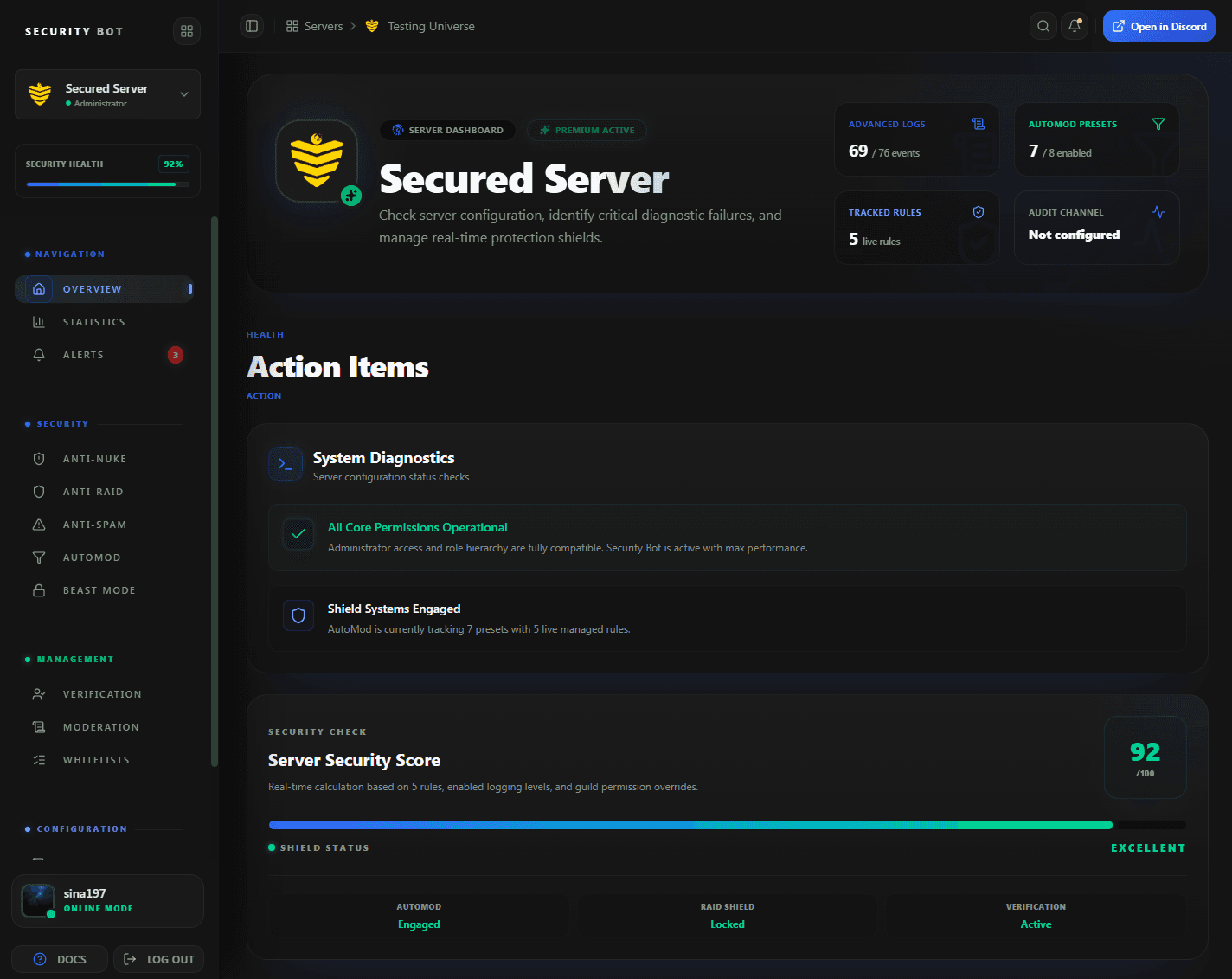
The dashboard overview. Anti-raid scoring and lockdown are set on the Anti-Raid page, opened from the sidebar.
Guides
Anti Raid guides
Step-by-step articles that go deeper on discord anti raid bot setups and problems.
Questions
Discord Anti Raid Bot FAQ
Common questions about Discord Anti Raid Bot use cases, coverage, and setup.
What makes Security Bot a Discord anti raid bot?
It scores every join on account age, join speed, and avatar. When the combined score reaches your limit, it times out or bans the accounts that joined in that window and can lock the channels you choose.
Will regular members get caught in a lockdown?
Existing members are not scored, and accounts older than the age bypass skip scoring. New members who joined in the same scoring window as a raid are punished with it. So set the limit well above your normal join volume, and consider timeout instead of ban.
Is anti-raid free?
No. Score-based anti-raid with lockdown is part of Premium. Free servers can use verification, the Anti Bot Add trigger, and Discord's built-in Raid Protection.
What settings should I start with?
Start from the defaults: 10 points for an account younger than three days, 5 for a join within 5 seconds of the previous one, 10 for no avatar, 2 for a normal join, and a limit of 200. Lower the limit only after checking how many legitimate joins you get in one reset window.
Does anti-raid work with verification?
Yes. Anti-raid scores the wave as it joins. Verification makes every member who gets in pass a check before posting.
How do I stop a raid that is already happening?
Run /lockall to lock every regular text channel, and pause invites in Server Settings > Invites. Let anti-raid punish the accounts in the scoring window. Then run /unlockall, which reopens only the channels Security Bot locked. Turn on lockdown in anti-raid so the chosen channels lock without a moderator online and reopen when the lock duration ends.
What counts as a rapid join?
Any join that comes within your join row delay of the previous join. Shorten the delay if real members often arrive together, for example after a stream. Lengthen it if raids trickle in slowly.
Does Discord have its own raid protection?
Yes. Raid Protection under Server Settings > Safety Setup detects join raids, sends Activity Alerts, and can require a CAPTCHA from new joiners for an hour. Anti-raid adds your own scoring, punishment of the wave, and channel lockdown.
Related
Explore more Security Bot features
Ready to protect your Discord server with Security Bot?
Add Security Bot to your server to get started with Discord Anti Raid Bot. Anti-raid, anti-spam, and the other Premium modules run on a separate bot; the Premium page explains how to add it.