
Channel Control
Discord Anti Spam Bot for Cleaner Channels and Faster Moderation
Security Bot is a Discord anti spam bot that counts the messages a channel gets in a short window. When a flood crosses your limit, it deletes the burst and locks the channel. Mention spam is handled by the anti-nuke mention trigger and AutoMod.
- Set a message limit (at least 5) and a window (at least 8 seconds). Anything past that is a flood.
- Auto clear deletes the flood. Auto lock stops @everyone posting in the channel for your chosen time, then reopens it.
- Mention spam is handled separately, by the anti-nuke @everyone mention trigger and the Block Mention Spam AutoMod preset.
Discord Anti Spam Bot
Security Bot for Discord servers
- Detection
- Messages per channel per window
- Response
- Auto clear + auto lock
- Availability
- Premium
Last reviewed 2026-10-12
Anti Spam coverage
Discord Anti Spam Bot features
Flood detection
Default: 20 messages in 8 seconds. Everyone's messages count together, including other bots and webhooks. Only Security Bot's own are ignored. The bot looks at the last 99 messages, so set the limit above your busiest normal chat.
Auto lock and auto clear
Auto clear deletes the flood's messages. Auto lock denies Send Messages to @everyone. A timed lock reopens on its own, even across bot restarts, and restores the old setting. A duration of 0, the default, keeps it locked until /unlock.
Mention spam protection
Anti Mention Spam caps @everyone and @here pings per user: 8 by default, reset every 10 minutes. It kicks, bans, or clears roles, skips Administrators, and starts on with Premium. Block Mention Spam stops mass mentions before they post.
What Discord spam looks like
Spam is rarely one account posting the same line. It is often a raid that got past the door and floods channels, a compromised member account posting scam links, or a user mass-mentioning until someone reacts. Each pattern needs a different response, which is why Security Bot splits the job across anti-spam, AutoMod, and anti-nuke.
Anti-spam handles volume: too many messages in a channel, too fast. AutoMod handles content: links, keywords, and mention counts. The anti-nuke mention trigger handles the user who keeps pinging @everyone.
How Security Bot anti-spam responds
When a channel gets more messages than your limit inside the time window, the bot acts. If auto clear is on, the messages from that window are deleted. If auto lock is on, @everyone loses Send Messages in the channel for the lock duration, and the bot posts a notice explaining the lock.
Anti-spam does not punish individual members and does not write to the log channels. The notice in the channel is the record. It runs in regular text channels only, not in threads, forum posts, announcement channels, or voice-channel chat.
Because the response is per channel, the rest of the server keeps working. Moderators can unlock early with /unlock if it was a false positive, which puts the channel's previous setting back. Or they let a timed lock expire. Exempt a channel where bursts are normal by adding it to the Channels: Spam whitelist.
Anti-spam with anti-raid and verification
Floods often follow a raid. Anti-raid scores the joins and can lock chosen channels. Verification keeps unverified accounts out of chat. Anti-spam catches floods that slip through. Running all three from one bot means one dashboard and no conflicting rules.
Free versus Premium spam protection
Anti-spam, the AutoMod presets, and the Anti Mention Spam trigger are part of Premium at $4.99 per month.
On the free tier, the anti-nuke invite link filter deletes Discord invite links outside whitelisted channels. Discord's own AutoMod, set up in Server Settings, can also block spam content and mention spam at no cost.
Recommended anti-spam settings by server size
Size the limit to your busiest channel, not to one person typing fast. The default of 20 messages in 8 seconds is a sensible starting point.
A small server with quiet channels can go lower, for example 10 messages in 8 seconds, but never below the minimum of 5 messages or 8 seconds. A large server with fast-moving general chat may need 30 or more in 8 seconds, or the busiest channel exempted with the Channels: Spam whitelist.
Set a lock duration between 30 and 120 seconds so the channel reopens on its own. Add the Block Mention Spam preset with a mention limit of 5, or 3 above 20,000 members, and slowmode on the busiest channels.
In every case, watch for lock notices during the first week. Raise the limit if real conversations trigger it.
A worked example: a flood in the general channel
Your limit is 20 messages in 8 seconds, auto clear is on, and the lock duration is 60 seconds. A compromised member account starts pasting a scam link while a few members reply. Within eight seconds the channel passes 20 messages. Security Bot deletes the messages from that window, including the replies, denies Send Messages to @everyone, and posts a notice that the channel is locked for one minute.
The rest of the server keeps chatting. A moderator sees the notice and softbans the account, so its recent messages elsewhere are deleted too. Then they unlock the channel early or let the 60 seconds run out.
Threat Link Guard, if enabled, would have deleted each scam link once it was posted. It runs inside the bot after the message appears, so pair it with anti-spam rather than relying on either alone.
Common anti-spam mistakes and how to fix them
A flood limit below your normal chat volume, for example 5 messages in 8 seconds on a busy server, locks channels during real conversations because everyone's messages count together. Match the limit to your busiest channel and adjust.
A long lock punishes every member for one spammer, and so does the default duration of 0, which keeps the channel locked until someone unlocks it. Usually 30 to 120 seconds is enough for a moderator to deal with the account.
Relying on the flood detector alone means single scam messages and mass mentions get through, since they never cross a volume threshold. Turn on the Block Mention Spam and Block Suspected Spam Content presets too.
On the Discord side, remove Mention Everyone from roles that do not need it and add slowmode to the busiest channels. Only roles with the Bypass Slowmode permission skip it.
What Discord provides natively and what anti-spam adds
Discord gives you slowmode per channel, timeouts, and AutoMod rules for spam content and mention spam that block a message before it posts. Those are the right tools for one bad message at a time. On Premium, Security Bot creates those AutoMod rules for you from presets.
Slowmode limits each person, but nothing native reacts when a whole channel suddenly fills, or locks the channel in response.
Anti-spam adds the time dimension: messages counted per channel inside a window, deletion of the burst, and an automatic channel lock for the duration you choose. The Anti Mention Spam trigger in anti-nuke adds a per-user limit on @everyone and @here pings.
Setup
How to set up Discord Anti Spam Bot
Steps that list a command can also be done in Discord. On Premium, settings commands such as /setlimit and /whitelist reply with a dashboard link instead.
Step 1: Turn on AutoMod presets first
On the AutoMod page, enable Block Mention Spam and Block Suspected Spam Content. They create Discord-native rules that block common spam before it posts.
Step 2: Open Anti-Spam under Protection
Anti-spam is part of Premium and runs on the Premium Bot. It starts on for a new server: 20 messages in 8 seconds, auto clear and auto lock on, lock duration 0.
Step 3: Set the message limit and window
Start from the default of 20 messages in 8 seconds. The minimum is 5 messages and 8 seconds. Raise the limit for busy channels, since every member's messages count together.
Step 4: Set the auto lock duration
Auto lock starts with a duration of 0, which keeps the channel locked until someone runs /unlock. Set 30 to 120 seconds so the channel reopens on its own after a flood.
Step 5: Check auto clear
Auto clear, on by default, deletes every message in the flood window, including replies from real members, so the channel reopens clean. Save, then watch for lock notices in busy channels during the first few days.
Dashboard
The Security Bot dashboard
The server overview in the web dashboard, where Discord Anti Spam Bot and every other module is configured.
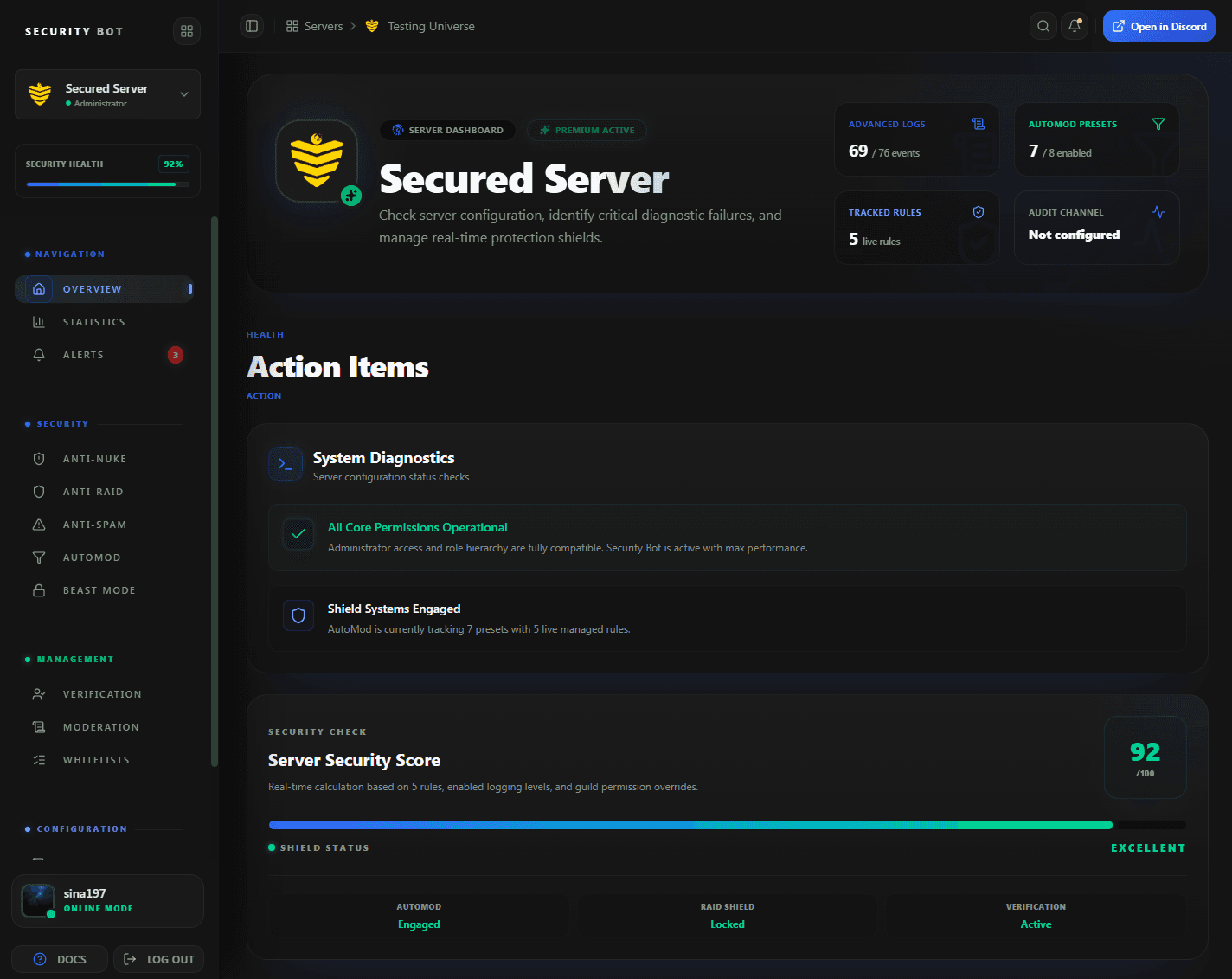
The dashboard overview. Flood limits, auto lock, and auto clear are set on the Anti-Spam page, opened from the sidebar.
Guides
Anti Spam guides
Step-by-step articles that go deeper on discord anti spam bot setups and problems.
Questions
Discord Anti Spam Bot FAQ
Common questions about Discord Anti Spam Bot use cases, coverage, and setup.
What kinds of Discord spam does Security Bot stop?
Message floods through anti-spam, @everyone and @here spam through the anti-nuke mention trigger, Discord invite links through the free invite link filter, and spam content, mention spam, and keyword spam through AutoMod presets.
Is anti-spam free?
No. The flood detector, the AutoMod presets, and the mention trigger are part of Premium. The invite link filter is free.
Will anti-spam lock channels during normal busy chat?
It can. Anti-spam counts every member's messages in the channel together, so a fast conversation can cross a low limit. Set the limit above your busiest normal chat, or exempt that channel with the Channels: Spam whitelist.
Does it delete the spam messages?
Yes. When auto clear is on, the messages posted in the flood window are deleted, which can include messages from members who were only replying.
How is this different from Discord's built-in AutoMod?
AutoMod blocks individual messages by content. Anti-spam watches the volume of a channel over time and can lock it, which AutoMod cannot do.
Does the flood detector count everyone's messages together?
Yes. It counts all messages in the channel inside the window, not per member, including messages from other bots and webhooks. That is why the limit should match your busiest channel.
What flood limit should I start with?
The default, 20 messages in 8 seconds. Raise it if real conversations trigger it. The lowest allowed values are 5 messages and 8 seconds.
Is anti-spam on by default?
Yes, on Premium. A new server starts with 20 messages in 8 seconds, auto clear and auto lock on, and a lock duration of 0, which keeps a locked channel closed until someone runs /unlock. Set a lock duration if you want channels to reopen on their own.
Is a flood written to the log?
No. Anti-spam posts a notice in the locked channel but does not write to the security log or punish the sender. Follow up with moderation commands.
Related
Explore more Security Bot features
Ready to protect your Discord server with Security Bot?
Add Security Bot to your server to get started with Discord Anti Spam Bot. Anti-raid, anti-spam, and the other Premium modules run on a separate bot; the Premium page explains how to add it.